 +48 609 465 960 /pon.-pt. 10:00-17:00/


Gotowe "show dmx" dla programu Freestyler wysyłamy w pliku backup, zawiera on wszystkie niezbędne do działania pliki (cue, chase, fixture) oraz ustawienia dodatkowe (location, correction, patch, keyboard schortcuts, itd.). W paczce poza plikiem backup znajduje się też instrukcja oraz obrazek przedstawiający konfigurację skrótów klawiaturowych.
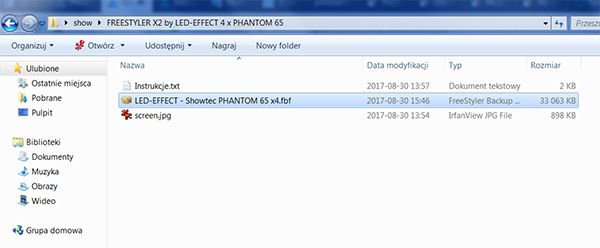
Rozpakuj otrzymaną paczkę "rar" wypakowując plik w dowolne miejsce na komputerze. Zainstaluj najnowszą wersję freestylera (www.freestylerdmx.be). Jeśli po instalacji uruchomiłeś program to go zamknij i otwórz plik backup który otrzymałeś w paczce rar (rozszerzenie .fbf):
Otworzenie pliku spowoduje uruchomienie programu Freestyler:
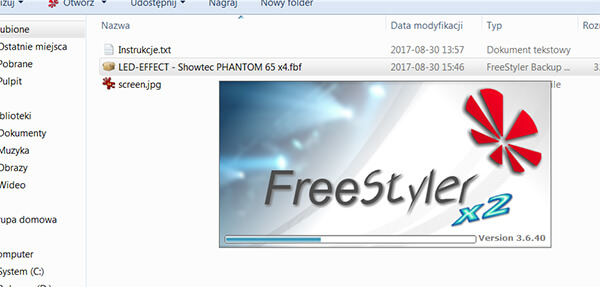
W tym momencie do programu ładują się wszystkie pliki oraz ustawienia potrzebne do poprawnego działania "show".
Po zakończeniu ładowania pojawi się komunikat: "Please restart FreeStyer after restore. Until then no changes will be saved" (czyli "Uruchom ponownie FreeStyer po przywróceniu. Do tego czasu żadne zmiany nie zostaną zapisane").
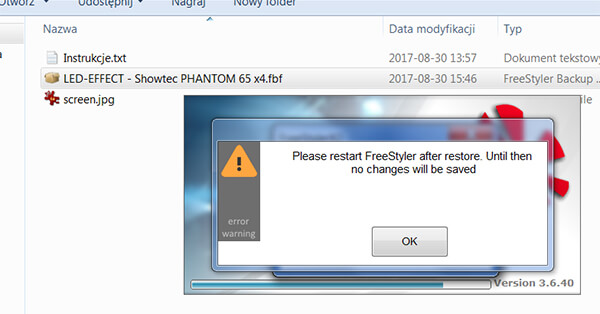
Klikamy OK i zamykamy program nie wprowadzając żadnych zmian.
Po zamknięciu programu uruchamiamy go ponownie tym razem korzystając ze skrótu na pulpicie:
Po ponownym uruchomieniu (i każdym kolejnym) program będzie się uruchamiał już z załadowanym "show":
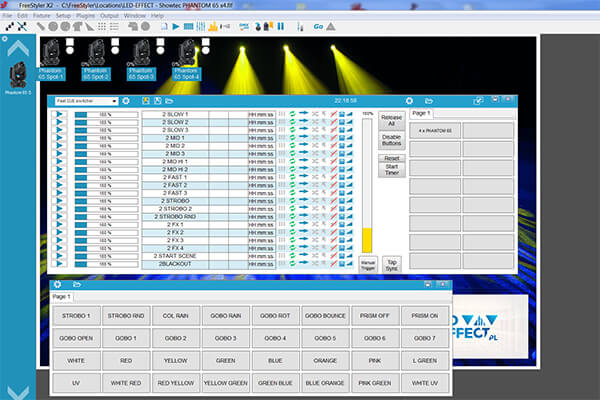
Gotowe, plik backup został poprawnie zainstalowany w programie.
W razie potrzeby należy zmienić ustawienia interfejsu usb/dmx lub bramki art-net. W tym celu wchodzimy SETUP - FREESTYLER SETUP i w zakładce INTERFACE SETUP odpowiednio skonfigurować wyjście UNIVERSE 1 (i/lub UNIVERSE 2). W większości przypadków dla interfejsu usb/dmx odpowiednim wyborem będzie "Enttec Open DMX", należy przy tym pamiętać o wcześniejszym zainstalowaniu sterowników dla interfejsu.
Więcej na ten temat: http://freestylerdmx.pl/interfacesetup.html
Po skonfigurowaniu systemu należy odpowiednio zaadresować podłączony sprzęt (ruchome głowy, pary itd). Należy przy tym pamiętać, że w większości urządzeń, poza adresem dmx konieczne jest wybranie odpowiedniego trybu dmx (ilości kanałów które zajmuje urządzenie). Wszystkie informacje na ten temat znajdują się pliku tekstowym który został załączony do "show".
W przypadku jakichkolwiek pytań, problemów prosimy o kontakt.